Your Complete Guide
Download & Install the App
Download the Radius Alerts APK directly from our servers — no Play Store needed. Open the file on your Android device, allow installation from unknown sources when prompted, and tap Install. The process takes under 60 seconds.
- ✓ Android 8.0 or higher required
- ✓ ~50 MB installation size
- ✓ Signed & verified APK
Sign In with Your Phone Number
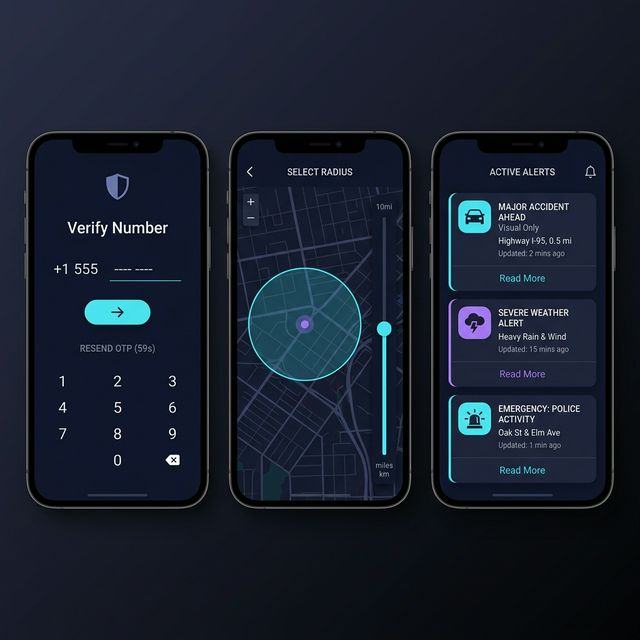
Open the app and sign in using your mobile number. We'll send you a one-time OTP for verification — no passwords to remember. Your account is created instantly using Firebase Authentication.
- ✓ No email or password needed
- ✓ OTP-based — takes 30 seconds
- ✓ Free trial activated automatically
Set Your Alert Radius & Categories
On the Home screen, use the radius slider to choose how far you want to receive alerts. Start with 5km and adjust to your preference. Then tap the filter icon to pick which alert categories you care about: accidents, weather, crime, fire, medical, and more.
- ✓ 1km to 50km radius range
- ✓ 8 alert categories to filter
- ✓ Instant save — no restart needed
Get Instant Push Notifications
Whenever a community member posts an alert within your radius, you'll get a push notification immediately — even when the app is in the background or your screen is off. Tap the notification to see full alert details, photos, and audio.
- ✓ Sub-second notification delivery
- ✓ Works with screen off (background)
- ✓ See photos & voice recordings
Post Your Own Alerts
Seen something your community should know about? Tap the "+" button, pick an alert type, add a description, and optionally attach photos or a voice recording. Your alert is reviewed by our AI moderation system (usually under 5 seconds) and then published to everyone in the area.
- ✓ AI moderated before publish
- ✓ Supports photo + voice recording
- ✓ Community can verify your alert
Subscribe via Razorpay (In-App)
After your free trial ends, subscribe in the app under Profile → Subscription. Choose Monthly, Quarterly, or Annual. Pay securely via UPI, debit/credit card, net banking, or wallet — all powered by Razorpay. That's it — full access restored instantly.
- ✓ Razorpay — PCI-DSS Level 1
- ✓ UPI, Cards, Net Banking, Wallets
- ✓ Cancel anytime, zero friction